The studio for vibe coding

You've been chatting with AI. Now create with it.

A chatbot can answer any of your questions. Creating software is a different story — the hard part is knowing what to do next, and next, and next. PreVibe makes that one button. Click Vibe, and the project advances — reviewed before it lands, reversible if you don't like it. No prompting required. Watch your idea grow, one Vibe at a time. Chatting is not creating. Vibe is.

For PMs, founders, designers, and developers who've outgrown the chat box — but don't want to live in a terminal.

  • Your work stays local — code, docs, and history never leave your laptop.
  • Your existing project stays safe — PreVibe adds a docs layer, never touches your source.
  • Your results come in plain language — no terminal, no code editor to read.
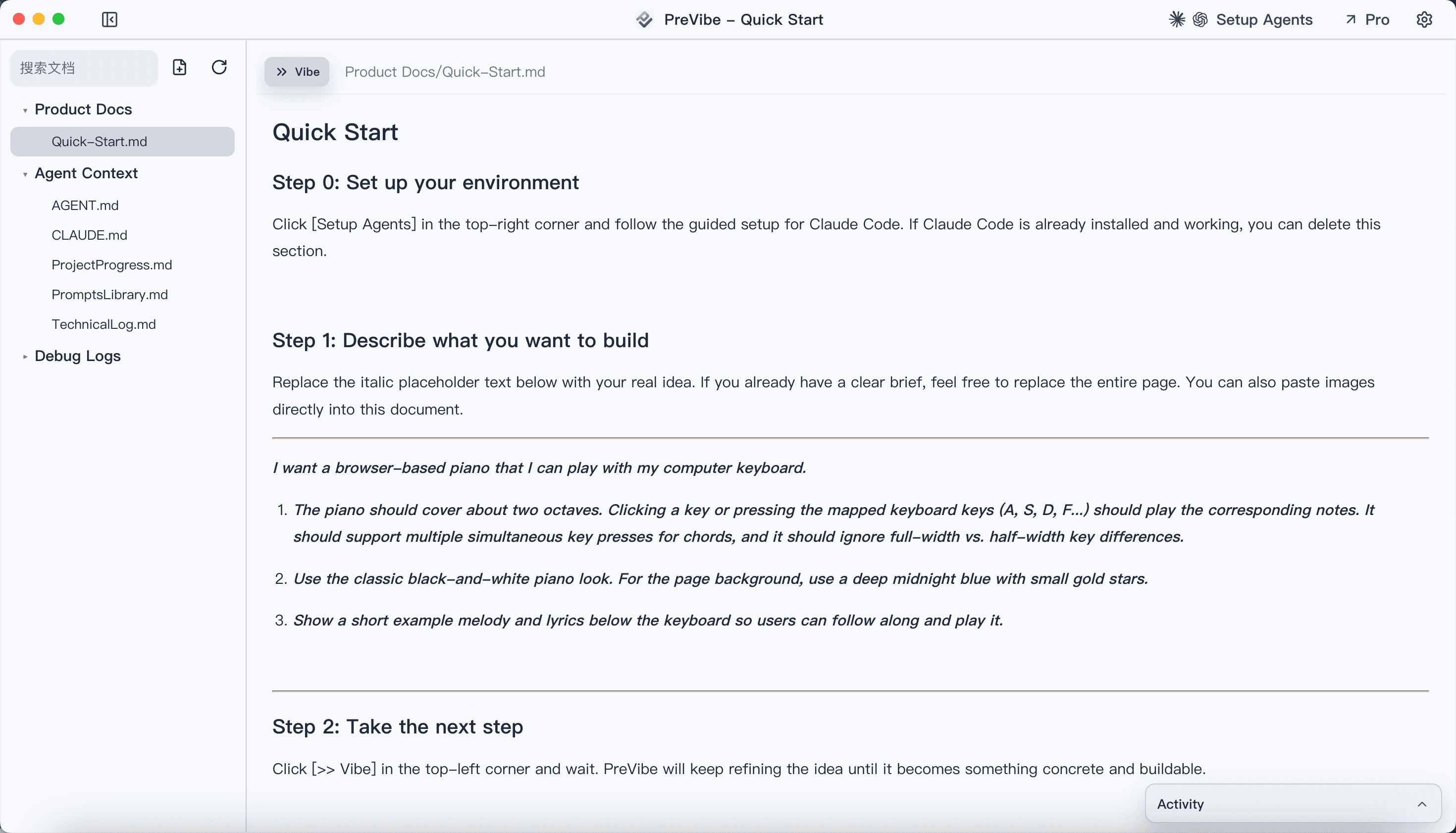
PreVibe desktop studio showing Vibe button, document canvas, and review queue for vibe coding

I am not a programmer. But my work gave me a working understanding of frontend, backend, databases — enough to form my own judgment about what it takes to build software.

After ChatGPT launched, I tried nearly every AI coding tool on the market. They kept getting more powerful, but the more I used them, the more I realized — non-technical people still face real friction when trying to build serious software through vibe coding.

Every tool forces you to face "code." Even when the command is trivial, the interface itself is a psychological barrier. And every tool treats conversation as the core interaction — great for generating a first draft, but once you need to refine, chatting becomes slower and harder than just editing directly.

I developed a habit early on: write what I want to say to AI in a document first, instead of typing straight into a chat box. Later, most tools added Plan Mode, and I was a heavy user. But I gradually realized it felt more like an interview — AI kept asking me questions, but rarely discussed anything with me.

After thinking this through, I became convinced there should be a vibe coding tool built around documents, not conversations. That is PreVibe.

PreVibe was built entirely through vibe coding. Now it's your studio to do the same.

Morrow, Founder, PreVibe

How Vibe works

How creating with Vibe actually works

No code to write. No prompts to craft. One loop, four moves. The project grows with every Vibe.

1
Step 1

Drop the seed

A sentence, a screenshot, a reference link — whatever you'd normally type into ChatGPT. That's your starting point. No template to fill out, no form to complete.

  • One sentence is enough to begin
  • Paste screenshots, references, or existing notes
  • Start fresh or bind to an existing repo
2
Step 2

Click Vibe — the project moves

One click. PreVibe figures out what stage your project is in — understanding, planning, building, refining — and advances the doc and the code from exactly where you left off. No prompt needed.

  • Every Vibe picks up from the current state, never a cold start
  • The document becomes the source of truth AI builds from
  • Leave comments on any line to steer the next iteration
3
Step 3

Review in plain language

Every AI change lands in a review queue — not straight into your code. You see what changed and why, in language you can actually read. Accept, reject, or keep iterating.

  • Changes explained in plain English, not raw patches
  • Doc edits and code edits reviewed side by side
  • Nothing auto-merges behind your back
4
Step 4

Run it. Ship when it's yours.

Build, test, and see real output on your own machine. Results flow back into the project history — so the next Vibe already knows whether the last one worked.

  • Run builds and tests without opening a terminal
  • Results feed back into Brief and History automatically
  • Commit and ship only when you're satisfied

Start from one sentence. Or connect PreVibe to an existing codebase.

Who creates with it

Who creates with PreVibe

If you've been chatting with AI about building software — and wished the result actually stuck — this is the next step.

Your PRD is the best AI input that already exists. Use it.

Product managers

You already write structured requirements. PreVibe lets that document drive the build directly — instead of being retranslated into prompts every sprint.

Push your spec all the way to something real

Designers

You don't need to learn to code. You just need to keep directing. PreVibe turns your interaction notes into a canvas AI builds from, and you stay in the loop on every change.

From chatting about the MVP to actually building it

Indie founders and builders

Every chat-to-app tool nails the first demo and stalls on iteration three. PreVibe gives you a local, iterative loop that keeps scope steady while the product evolves.

A control layer above Cursor, Claude Code, and Codex

Developers

You already know how to prompt. What you want is fewer context resets. PreVibe sits above your coding agent, anchors scope in a document, and turns Review, Run, and History into a real delivery loop.

Inside the studio

Inside the studio

Not concept art, not mockups. This is what running PreVibe actually looks like.

PreVibe studio showing the Vibe button, document canvas, and review queue

Your project, your canvas, your Vibe button — one window

One button at the center: Vibe

PreVibe is a desktop app, not another browser tab. Your project, documents, review queue, and Vibe button all live in one local workspace. Click Vibe and watch the project advance.

From one sentence to a full project structure

Your canvas grows with every Vibe

Start with a seed. Each Vibe click expands the document, adds context, and generates code — all reviewable before it lands. The canvas is yours to read, edit, and direct at any point.

Monthly

Start creating for free. Scale when you're ready.

Free gives you the full creation loop locally. Pro and Max add the PreVibe proxy — so you don't need to set up Claude Code or Codex yourself, and the AI just works when you click Vibe. All paid plans come with a 7-day money-back guarantee — no questions asked.

Free
Local

Run locally with Claude Code or Codex. Requires your own subscription.

$0/month
No card required.
  • Run with local Claude Code or Codex
  • Full Vibe → Review → Run → History loop
  • Review / Run / History basics included
  • Works with new or existing projects
Download Free
Pro
Recommended

Good for small projects. No separate Claude Code or Codex setup required.

$20/month
Billed monthly.
  • PreVibe proxy access for daily work
  • Switch between Proxy and Local modes
  • Manage billing, credits, and account in the desktop app
  • Higher usage limits for regular delivery
Get Pro
Max
Higher limits

Higher limits, priority access

$100/month
Billed monthly.
  • Everything in Pro
  • Much higher monthly credits
  • Higher concurrent request limits
  • Priority handling during busy periods
Get Max
FAQ

Frequently asked questions

The biggest questions, answered before you download.

No. One sentence is enough. PreVibe grows the document with you — each Vibe click expands it based on your seed, screenshots, references, and the project's current state. You spend most of your time reviewing and directing, not writing from a blank page.

PreVibe

Your first Vibe takes one sentence. Download PreVibe and start creating.

Free gives you the full loop locally. Upgrade to Pro only when the proxy genuinely saves you time.

PreVibe — The Studio for Vibe Coding | PreVibe